The first thing to come in a long line of rants about ants.
In fact, here's the code to post it somewhere if you want:
Showing posts with label actionscript. Show all posts
Showing posts with label actionscript. Show all posts
Wednesday, July 1, 2009


Monday, June 15, 2009
Using MonsterDebugger with AsUnit tests
So I've been using two new tools lately to develop my framework - De Monster Debugger and AsUnit. De Monster is a tool that allows for introspection of you running swf through their air front end. All methods and properties are exposed, and can be executed or edited right from their tree interface. You can find it here or watch Lee Brimelow's tutorial about it.
AsUnit is a unit testing framework for actionscript which allows you to run automated test suites on the smallest, indivisible pieces of your code to ensure integrity. In my opinion the real power of unit testing comes from two places - it formalizes the elimination of possible bug causes, (no more sloppy, randomly placed traces or commenting out code), and secondly it's no big deal to run your entire suite of tests every time you compile your swf, so you catch on when bugs in one class effect other classes in ways you didn't expect.
In essence, AsUnit is basically a framework for setting your classes and pieces of code on stilts for further examination, but to achieve this, it's standard practice to encapsulate your classes into the test suites in awkward - yet beneficial (to the unit testing) - ways. Let's examine these.
package com.framework.tests.units {

import asunit.framework.TestSuite;
import com.framework.tests.units.LinkNodeTest;
import com.framework.tests.units.LinkedListTest;

/**
* @author Will Saunders
*
* Unit Test Suite for the framework
*
*/

public class AllTests extends TestSuite {

public function AllTests() {

 super();

 // Link Node Tests
 addTest(new LinkNodeTest("testInstantiated"));
 addTest(new LinkNodeTest("testAutoAddChild"));
 addTest(new LinkNodeTest("testManualAddChild"));
 addTest(new LinkNodeTest("testRemoveChild"));
This is an example TestSuite for AsUnit. Test classes - LinkNodeTest in this case - contain the logic for administering and checking the tests, while TestSuites group all the tests together. If you look closely, however, you'll notice that each of these tests happen independently of one another - one test does not run on the same data objects as the ones before or after because a new instance of LinkNodeTest is established for each test. Furthermore their syntax abstracts the inner parts of the Test classes from us. While this method is mostly always a good thing (for the sake of maintaining granular, "blank slate starts" in the tests), but if you want to look into the tests with Monster Debugger to see what's actually happening or what the data looks like after your tests have run you'll have to jump through a few hoops.
First we will add a lasting reference to the particular instance we'd like to examine more closely. I only set aside one of these at a time and to encourage myself not to get too far away from the point of unit testing. We will also add the necessary classes for the debugger:
package com.framework.tests.units {

import asunit.framework.TestSuite;
import com.framework.tests.units.LinkNodeTest;
import com.framework.tests.units.LinkedListTest;

import nl.demonsters.debugger.MonsterDebugger;

/**
* @author Will Saunders
*
* Unit Test Suite for the framework
*
*/

public class AllTests extends TestSuite {

public var failedTest:LinkedListTest = new LinkedListTest("testRemoveChild");
public var bugger:MonsterDebugger = new MonsterDebugger( this );

public function AllTests() {

 super();

 // Link Node Tests
 addTest(new LinkNodeTest("testInstantiated"));
 addTest(new LinkNodeTest("testAutoAddChild"));
 addTest(new LinkNodeTest("testManualAddChild"));
 addTest( failedTest );
Now through this reference to the test, we may inspect the inner contents. In the following picture you can see the failedTest reference and the data inside of it :) - 
Sunday, June 14, 2009
Typecast slip up in with Numbers in As3
I always seem to run into the same problem with Actionscript 3 when typecasting (converting an object from one type to another). It has to do with the use of the as keyword because I've fallen into the habit of doing all typecasting this way - the benefit being that it will fail gracefully and return the default value for the type you're trying to cast to (usually this is a null).
The trickiness comes when I try to typecast something to a number like this:
var testString:String = "77";
trace( testString as Number );
// Traces null

var testNumber:Number = testString as Number;
trace( testNumber );
// Traces 0
This is a problem because this particular syntax will always return a null, which sometimes leads me to spend too much time tracing this down because sometimes I'm writing code that handles null values gracefully. Anyways, the proper way is:
var testString:String = "77";
trace( Number(testString) );
// Traces 77
Sunday, June 7, 2009
Code package management in flash and eclipse
There was a time where I'd have a copy of a framework or as3 code package in the folder of every project I'd use it in. This wasn't a big deal, until I did a search one day and realized I had about nine copies of Tweener strewn about my harddrive - a situation ridiculous enough to merit change.
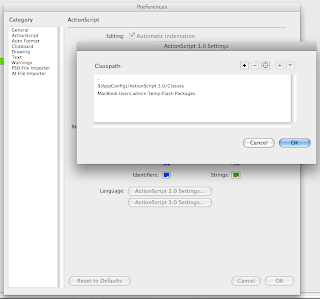
There are also a number of token/variable things you can use to represent certain important locations. If anyone knows of more, let me know:
I created a folder named Flash Packages, and copied every bit of code I reuse (or even might) to it. In the flash IDE the change was simple enough - add this new folder to your list of classpaths. To get there you open Flash's preferences, navigate to the Actionscript panel, and - under the "Language" label - click on the button for Actionscript 2 or 3 respectively. This will alter the global classpath (affecting every flash document you create in the IDE). Settings for the document-level classpath can be found in the Publishing settings. Add your new created and sorted package folder to the list and you're done :)
What's more interesting, however, is the fact that you can add relative paths as well. There's a default entry of "." which causes every FLA to include any classes in it's own directory, while an entry of ".." would cause the directory's parent to be searched.

There are also a number of token/variable things you can use to represent certain important locations. If anyone knows of more, let me know:
- $(AppConfig) - Flash CS3 configuration folder, which contains default Actionscript classes
- $(LocalData) - Not exactly sure where this one points
My workflow includes both flash and the Eclipse editor, though, and for the longest time I couldn't figure out how to mirror this kind of change in it's environment. Just found out how to do it, though, and it's pretty easy. Just add a folder to your project (New>Folder), click the Advanced button, and set up the option for "Link To Folder In the File System" :) This is where you'll add packages from the folder of actionscript libraries you created earlier.
Monday, April 20, 2009
Workflow
I'm starting to realize just how big of an undertaking this could all turn out to be. Drastic changes will have to be made if it's going to be anything resembling feasible. Though I see this is a primarily artistic endeavor, efficiency will be key. Hell, especially because it's artistic. It's as easy for an artist to lose all track of time in pursuit of some romantic notion as it is for a programmer to spend several days straight hunched over a screen atop a mountain of empty Mountain Dew cans sans food. If I'm to figure out where I can improve, I'll need a bit more clarity concerning the time I spend on things, and the act of refining takes plenty of it so I'll only be spending more.
Sitepoint was gracious enough to have covered the act of time tracking already. Here's their list of 7 Time Tracking Tools. I'm giving Time Tracker for OSX a try. It's simple and the price is right. Used to have some dashboard widget that had similar functionality but I'd always forget to turn it off. Time tracker gives you a nice little icon in the menu bar.

Anyways, as much time as i'd be recovering through greater insight, there's also time I could be saving through efficiency in planning, attention to detail, and - most important - modularity. To me this sounds like Object Oriented Programming. For those of you that don't know, here's what Wikipedia has to say about it:
Object-oriented programming (OOP) is a programming paradigm that uses "objects" and their interactions to design applications and computer programs. [...] As hardware and software became increasingly complex, quality was often compromised. Researchers studied ways to maintain software quality and developed object-oriented programming in part to address common problems by strongly emphasizing discrete, reusable units of programming logic.
By breaking a program down into modular, reusable components, you increase agility (the ability to change conceptual directions quickly yet w/ stability ) and productivity. It's quite inspiring to see solid Object Oriented code at work. So inspirational that it really just makes common sense to apply it to areas outside of just code. In fact I'm sure there are hundreds of man-made situations where the label fits despite designers not being aware of the concept of things being O.O, not to mention countless examples in science and nature. Where better to draw inspiration from, right?
This paradigm closely reflects the structure of systems 'in the real world', and it is therefore well suited to model complex systems with complex behaviours.Niklaus Wirth - Good Ideas through the Looking Glass
The most obvious application of these tenants is to the code I make for websites so that's where I've began - by doing a great deal of research and planning for an Actionscript 3 framework. I'll spend a lot of time getting the technical details right this once so that - in the future - I'll be able to focus primarily on the overall design of a site. While this will be primarily geared towards sites, it won't take much to expand it with a backend for RIAs (Rich Internet Applications), and I can even see myself going as far as using it in interactive art installations. To get my ideas out in solid but fluid form I used PersonalBrain - a program for "mind mapping." With the right kind of thinking, you can use it to plan out anything that can be thought of in terms of hierarchical or interrelated concepts (which is pretty much everything ever so...). I highly recommend checking it out. Here's a screenshot of the mindmap for the framework thus far:

The entire map is much bigger than what's here but there are the areas I plan on focusing on initially. I've already got quite a few classes in the package so I'll probably be writing about it with more depth soon (and posting source).
I'll be racking my brain over the next few weeks to figure out how to maximize efficiency. Stay tuned.
Subscribe to:
Posts (Atom)
